Ten minutes of downtime doesn’t feel like much.Until you realize it’s happening on every machine, every shift, every day.
What if you could see and stop those losses in real time?
Downtime data collection is the process of tracking when machines stop, how long they stop, and the reason for each stoppage. On a shop floor, downtime can be collected manually through logs and Excel sheets or automatically using machine signals and monitoring software. Automated downtime tracking captures precise timestamps, structured reason codes, and real-time dashboards to improve OEE and reduce production losses.
What you’ll learn:
How to collect downtime data?
Downtime looks small when you see it once.
Ten minutes here.
Fifteen minutes there.
A small stoppage during changeover.
But when you add it up across machines, shifts, and weeks, downtime quietly becomes one of the biggest hidden losses on the shop floor.
So how do you actually collect downtime data in a structured and reliable way?
First, you need clarity.
Downtime must be clearly defined across the factory. What counts as planned downtime? What is considered unplanned downtime? Does a 3-minute stoppage get recorded? Are minor jams ignored? If definitions differ between shifts or supervisors, your data will never be comparable.
Once definitions are standardized, every downtime event must capture three things:
- When it started
- When it ended
- Why it happened
These three elements turn downtime into actionable information.
Next, you need a mechanism to detect stoppages. Either an operator manually records them, or a system automatically detects machine state changes. The choice between these two methods determines whether your downtime data becomes a powerful improvement tool — or just another report.
Finally, the data must be visible. If downtime information is locked inside a register or an Excel sheet that gets reviewed once a month, it won’t drive improvement. The best downtime data is real-time, structured, and immediately accessible to production and maintenance teams.
That’s the foundation. Now let’s look at the two ways companies typically collect downtime data.
Manual downtime collection vs automatic downtime collection
Manual downtime collection
Manual downtime collection is still common in many factories.
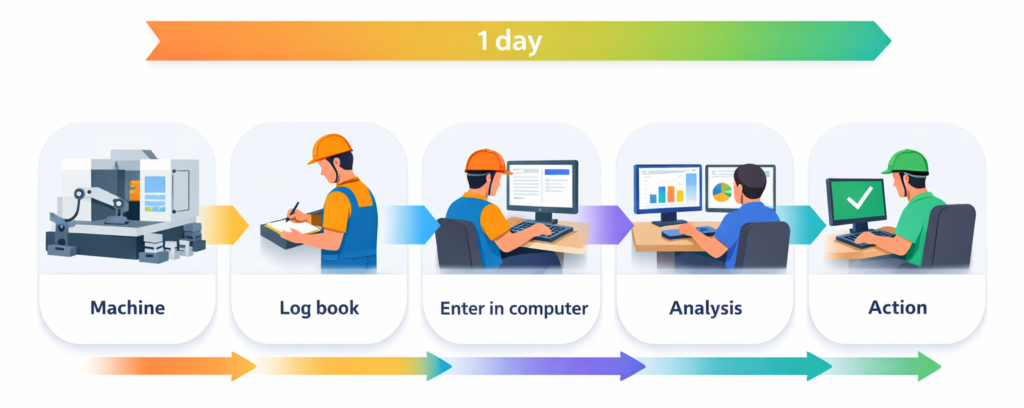
Operators write downtime details in a register. Sometimes they enter it into Excel at the end of the shift. Supervisors consolidate the data and prepare reports later.
On the surface, this feels manageable. It doesn’t require new technology. It doesn’t change existing processes.
But over time, issues start appearing.
Micro stoppages are rarely recorded. Short interruptions feel “too small” to note down. Operators may forget exact start and end times. Sometimes downtime is rounded off. Sometimes reasons are guessed to save time. Data entry may happen hours after the actual event.
The result? The numbers look neat — but they are rarely accurate.
Manual collection gives you historical records. It rarely gives you real-time control.
Automatic downtime collection
Automatic downtime collection works differently.
Machines send signals that indicate whether they are running or stopped. The system continuously monitors these signals. When production stops beyond a defined threshold, downtime is recorded automatically — with precise timestamps.
Operators only need to select the reason for stoppage from a predefined list.
This removes the biggest weakness of manual systems: human error and delay.
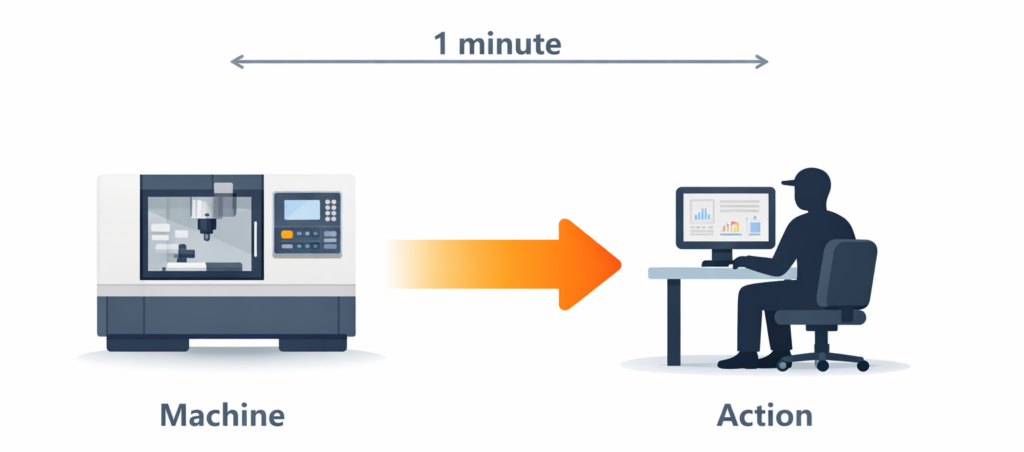
Every stoppage, even micro downtime, gets captured. Managers can see live dashboards. Maintenance teams can react during the shift instead of the next day.
Automatic collection transforms downtime from “data for reporting” into “data for decision-making.”
| Aspect | Manual Downtime Collection | Automatic Downtime Collection |
|---|---|---|
| How it works | Operators record downtime in registers or Excel sheets after the event. | Machine signals are captured continuously and downtime is detected automatically. |
| Data capture timing | Often entered at the end of the shift or later. | Captured instantly when the machine stops. |
| Timestamp accuracy | May be estimated or rounded off. | Precise start and end times recorded automatically. |
| Micro stoppage tracking | Frequently ignored or missed. | Captured based on configured time thresholds. |
| Human dependency | High — relies completely on operator discipline. | Low — automation handles time tracking. |
| Reason code entry | Written manually; may vary by shift. | Selected from a standardized digital list. |
| Visibility | Historical reports, usually daily or weekly. | Real-time dashboards and instant updates. |
| Decision impact | Used mainly for reviewing past performance. | Enables immediate corrective action. |
| Data reliability | Structured but often inconsistent. | Consistent, standardized, and actionable. |
How to create a downtime report?
Let’s be honest. Most downtime reports are created in Excel.
Someone exports data from different sources. They clean it. They build pivot tables. They calculate totals. They create graphs. Then they email a PDF before the review meeting.
This process consumes time every week.
More importantly, it delays action.
A better approach is product-led reporting where the system itself generates downtime reports automatically as soon as data is captured.
Instead of building spreadsheets manually, your reporting system should instantly show:
- Total downtime per machine
- Top downtime reasons ranked by impact
- Planned vs unplanned downtime split
- Shift-wise comparisons
- Trend analysis over time
- MTBF and MTTR
When downtime reports are auto-generated, meetings change. Teams no longer ask, “Can we get the data?” The data is already there. The discussion moves directly to “How do we fix this?”
Automated reporting doesn’t just save time. It improves the speed of problem-solving.
And that’s where a dedicated shop floor monitoring system becomes valuable.
Is there any software that will create and track downtime?
Yes.
Modern shop floor monitoring systems are designed to automatically track machine performance and generate downtime reports in real time.
One such system is Leanworx.
Leanworx connects to machines, collects live production data, and automatically tracks downtime without manual effort. Instead of compiling spreadsheets, managers get dashboards that display machine status, downtime breakdowns, and production losses instantly.
The software doesn’t just record when machines stop. It organizes downtime by reason, calculates key metrics like MTBF and MTTR, and shows the direct impact on OEE .
The idea is simple: reduce manual reporting effort and increase visibility.
When downtime data becomes structured and instantly available, improvement initiatives become data-driven rather than assumption-based.

How does Leanworx track downtime?
Understanding the technical side helps clarify why automated tracking is more reliable.
Leanworx connects directly to machines using available signals. If a machine has a PLC, the system reads production signals such as cycle completion, machine running status, or digital outputs using industrial communication protocols.

If PLC access is not available, external sensors can detect machine activity. For example, current sensors can identify whether a motor is running. This allows downtime tracking even on older machines.
Once connected, Leanworx continuously monitors machine state.
When the system detects that production has stopped beyond a predefined threshold, it automatically records the downtime start time. When the machine resumes production, it records the end time. These timestamps are captured with high precision, eliminating manual estimation errors.
To categorize downtime properly, operators can select a reason code from a predefined list on a shop floor interface. This ensures that downtime classification remains structured and standardized across shifts.
After data collection, Leanworx processes the information to generate insights. It calculates total downtime, breakdown frequency, mean time between failures, mean time to repair, and overall OEE impact. All dashboards update in real time.
Managers can filter data by machine, shift, date range, or reason. Maintenance teams can identify recurring breakdowns quickly. Production heads can compare shifts and identify performance gaps.
This structured approach ensures that downtime data is accurate, real-time, and actionable.
Try Leanworx for free
Downtime will not reduce just because you measure it.
But you cannot reduce what you cannot see clearly.
If you’re currently tracking downtime using registers or Excel sheets, you’re likely spending more effort preparing reports than solving problems.
Leanworx makes downtime visible the moment it happens. It captures accurate timestamps automatically, structures reason codes properly, and generates instant reports without manual consolidation.
See live downtime data.
Identify your biggest loss contributors.
Then expand across the shop floor.
When downtime becomes transparent, improvement becomes practical.
Try Leanworx for free and experience real-time downtime tracking in your factory.
2. Why does high Work in Progress cause production delays?
High WIP hides bottlenecks and creates long queues between processes.
Even when machines are running, excess WIP slows down flow, increases waiting time, and makes delivery dates unpredictable.
More WIP does not mean more output — it often means more delay.
3. How is Work in Progress (WIP) calculated in manufacturing?
WIP is calculated using this formula:
WIP = Beginning WIP + Production Started − Finished Goods
This calculation only works when production data is accurate and updated in real time.
Delayed or manual data leads to incorrect WIP numbers and poor decisions.
4. Why is manual or end-of-shift WIP tracking unreliable?
Manual and end-of-shift tracking shows what already happened, not what is happening now.
By the time WIP is reported, bottlenecks have already caused delays.
This forces managers to react late instead of controlling production in real time.
5. How can manufacturers track Work in Progress in real time?
Real-time WIP tracking requires automatic capture of shopfloor events such as job start, pause, and completion.
When these events are recorded instantly, WIP can be calculated live and shown stage-wise, helping teams spot issues early and keep production predictable.